A well-designed website with high-quality content is often assumed to be enough for achieving strong search engine rankings. However, many businesses experience a different reality. Despite investing in design, content creation and marketing efforts such as a well-planned Digital Marketing Strategy, their websites fail to generate consistent traffic or meaningful leads.
This disconnect usually stems from underlying technical issues that prevent search engines from properly accessing and evaluating the website.
Technical SEO addresses these foundational aspects. It focuses on optimizing the infrastructure of a website so that search engines can efficiently discover, interpret, and store its content. Without a solid technical framework, even the most valuable content may remain invisible in search results.
Search engines rely on structured processes to evaluate websites. If a site has barriers such as poor crawlability, slow performance, improper indexing signals, or weak architecture, it can struggle to compete regardless of how strong its content strategy may be.
In practical terms, technical SEO ensures that:
Search engines can access all important pages
Content is interpreted correctly
Pages are eligible to appear in search results
Website performance meets user and search engine expectations
For modern websites, technical SEO is not an optional enhancement—it is a critical requirement. As search engines continue to evolve and prioritize user experience, factors such as site speed, mobile usability, and structured data have become essential components of visibility.
This technical SEO guide provides a comprehensive and practical understanding of technical SEO. It is designed to help you identify key issues, implement improvements, and build a technically strong website that supports long-term growth in search rankings.
Why Technical SEO Matters
Technical SEO plays a decisive role in determining whether a website can be discovered, understood, and ranked by search engines. While content and backlinks influence visibility, their effectiveness depends on a technically sound foundation. Without it, even well-written content may fail to appear in search results.
Search engines operate through a structured evaluation system. Before a page can rank, it must successfully pass through multiple stages, each of which is influenced by technical factors. Any weakness at these stages can limit or completely block visibility.
Following a structured SEO technical checklist helps ensure that your website passes each stage of this evaluation process without limitations.
Search Engine Evaluation Process
Search engines assess websites through four key stages:
1. Discovery (Crawling)
Search engines use automated bots to find content by following links across the web. If a website has poor internal linking, blocked resources, or inaccessible pages, important content may never be discovered.
2. Analysis (Processing)
Once a page is discovered, search engines evaluate its structure, content, and technical elements. Clean code, proper HTML structure, and accessible resources help search engines interpret the page accurately.
3. Storage (Indexing)
After processing, pages are stored in a search engine’s index. Only indexed pages are eligible to appear in search results. Technical issues such as incorrect directives or duplicate signals can prevent pages from being indexed.
4. Positioning (Ranking)
Search engines determine the order in which pages appear based on relevance, quality, and performance. Technical factors such as page speed, mobile usability, and site stability directly influence this stage.
Failure at any of these stages can prevent a website from achieving visibility, regardless of how strong its content may be.
What is Technical SEO?
Technical SEO refers to the process of optimizing the structural and backend elements of a website to improve how search engines access, interpret, and rank its content. Unlike content-focused or authority-driven strategies such as Search Engine Optimization services, technical SEO ensures that a website functions efficiently from a search engine’s perspective.
It focuses on removing barriers that may prevent search engines from properly interacting with a website and ensures that all critical pages are accessible, understandable, and eligible to appear in search results.
Core Objective of Technical SEO
The primary goal of technical SEO is to create an environment where search engines can efficiently process a website without encountering obstacles.
This involves ensuring that:
All important pages can be discovered
Content is structured in a way that is easy to interpret
Pages are correctly indexed
Technical performance meets modern standards
Rather than improving what users see directly, technical SEO improves how search engines interpret what users see.
Key Components of Technical SEO
Technical SEO is not a single activity but a combination of multiple elements working together. Each component plays a specific role in improving visibility and performance.
1. Crawlability
Crawlability determines whether search engine bots can access and navigate your website.
A crawlable website:
Has a clear internal linking structure, similar to frameworks used in an On-Page SEO Checklist
Does not block essential pages or resources
Allows bots to move freely between pages
If pages are not crawlable, they cannot be discovered or evaluated.
2. Indexability
Indexability defines whether a page can be stored in a search engine’s database and shown in search results.
Even if a page is accessible, it may not be indexed due to:
Incorrect directives (such as noindex)
Duplicate content signals
Technical errors
Only indexed pages have the potential to rank.
3. Website Performance
Performance refers to how quickly and efficiently a website loads, something that is directly influenced by professional Website Development practices and responds to user interactions.
Important performance factors include:
Page load speed
Server response time
Resource optimization
Search engines prioritize fast and stable websites because they provide a better user experience.
4. Mobile Usability
With mobile-first indexing, search engines primarily evaluate the mobile version of a website.
Technical SEO ensures that:
Pages are responsive across devices
Content is accessible on smaller screens
Navigation remains functional and user-friendly
A poor mobile experience can directly impact rankings.
5. Website Architecture
Website architecture defines how pages are organized and connected.
A well-structured website:
Helps search engines understand content hierarchy
Improves navigation for users
Distributes authority across pages
Poor structure can make it difficult for search engines to identify important content.
6. URL Structure
URLs provide context about a page’s content and location within a website.
Optimized URLs are:
Clear and descriptive
Consistent in format
Free from unnecessary parameters
Clean URLs improve both usability and search engine understanding.
7. Security (HTTPS)
Security is a fundamental requirement for modern websites.
Technical SEO ensures:
Data is encrypted through HTTPS
Users can browse safely
Search engines trust the website
Secure websites are preferred in search rankings.
8. Structured Data
Structured data helps search engines interpret the meaning of content more accurately.
It provides additional context about:
Articles
Products
Reviews
Business details
This can enhance how pages appear in search results.
These components together form a practical technical SEO checklist that ensures your website is fully optimized for search engine visibility.
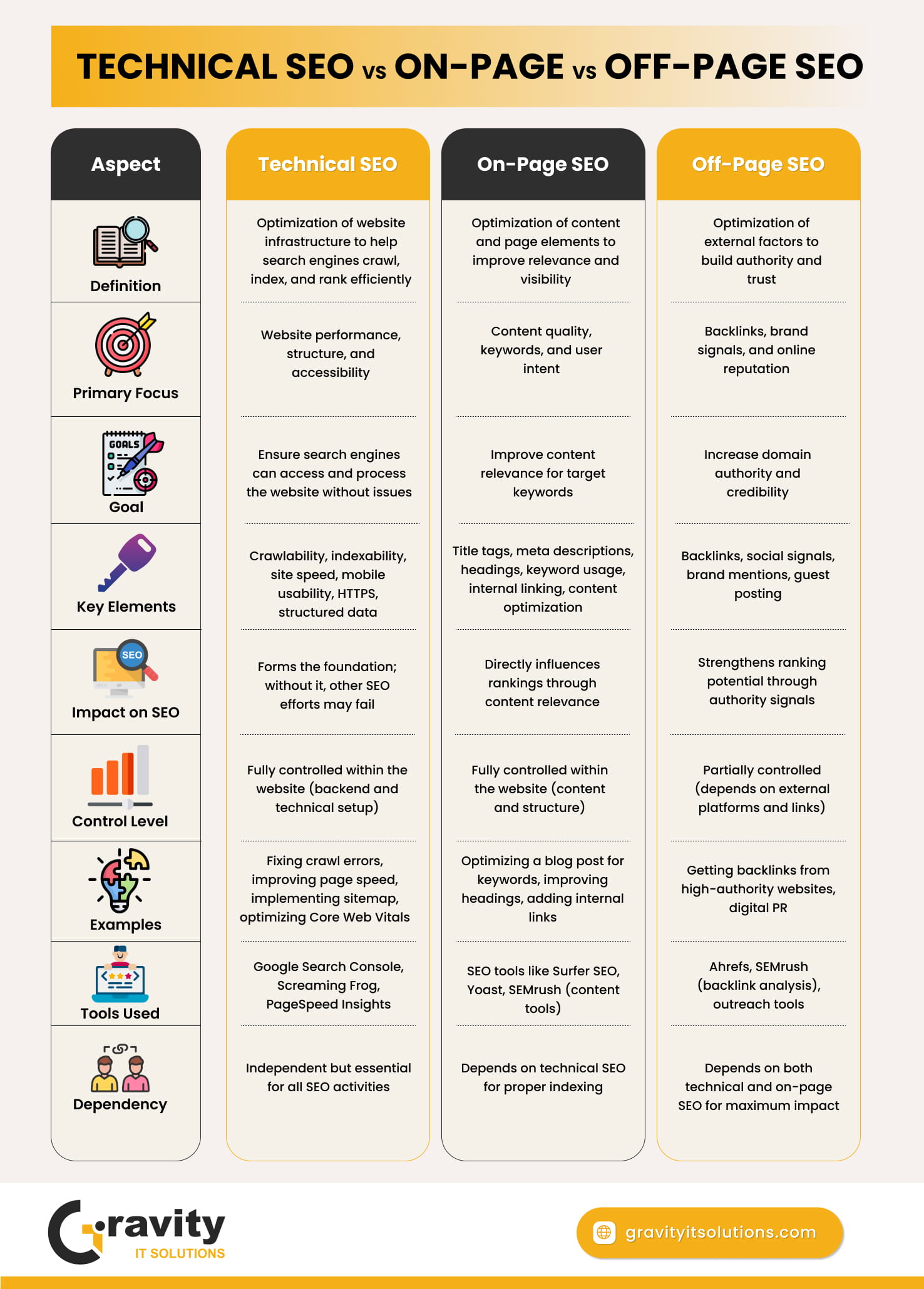
Technical SEO vs On-Page vs Off-Page SEO
Aspect
Technical SEO
On-Page SEO
Off-Page SEO
Definition
Optimization of website infrastructure to help search engines crawl, index, and rank efficiently
Optimization of content and page elements to improve relevance and visibility
Optimization of external factors to build authority and trust
Primary Focus
Website performance, structure, and accessibility
Content quality, keywords, and user intent
Backlinks, brand signals, and online reputation
Goal
Ensure search engines can access and process the website without issues
Improve content relevance for target keywords
Increase domain authority and credibility
Key Elements
Crawlability, indexability, site speed, mobile usability, HTTPS, structured data
Title tags, meta descriptions, headings, keyword usage, internal linking, content optimization
Backlinks, social signals, brand mentions, guest posting
Impact on SEO
Forms the foundation; without it, other SEO efforts may fail
Directly influences rankings through content relevance
Strengthens ranking potential through authority signals
Control Level
Fully controlled within the website (backend and technical setup)
Fully controlled within the website (content and structure)
Partially controlled (depends on external platforms and links)
Depends on both technical and on-page SEO for maximum impact
How Search Engines Work
To effectively implement technical SEO, it is essential to understand how search engines operate. Every search engine follows a structured process to discover, analyze, and rank web pages. This process determines whether your website appears in search results and how prominently it is positioned.
At a high level, this process consists of three core stages: crawling, indexing, and ranking. Each stage is interconnected, and technical SEO plays a critical role in ensuring that your website moves smoothly through all of them.
1. Crawling
Crawling is the first step in the search engine process. It involves discovering new and updated content across the web.
Search engines use automated programs, often referred to as crawlers or bots, to navigate websites. These bots follow links from one page to another, identifying new pages and revisiting existing ones to detect updates.
How Crawling Works
Bots start with a list of known URLs
They follow internal and external links
They continuously discover new pages through navigation paths
A website that is well-structured and properly linked allows bots to move efficiently between pages.
Factors That Affect Crawling
Internal linking structure
Accessibility of important pages
Robots.txt configuration
Server response time
Availability of CSS and JavaScript files
If important pages are not linked or are blocked, search engines may never discover them.
Common Crawling Issues
Orphan pages with no internal links
Blocked pages in robots.txt
Broken links leading to errors
Slow server response affecting crawl frequency
If a page cannot be crawled, it cannot move to the next stage.
2. Indexing
Once a page is crawled, it moves to the indexing stage. During this process, search engines analyze the page and store it in their database.
Indexing determines whether a page is eligible to appear in search results.
What Happens During Indexing
Search engines evaluate multiple aspects of a page, including:
Content relevance and topic
Page structure and hierarchy
Use of headings and metadata
Internal linking signals
Based on this analysis, the page is either added to the index or excluded.
Why Pages May Not Be Indexed
Not all crawled pages are indexed. Common reasons include:
Duplicate or low-quality content
Incorrect use of noindex directives
Conflicting canonical tags
Technical errors preventing proper interpretation
Pages that are not indexed will not appear in search results, regardless of their quality.
Importance of Indexing in SEO
Indexing acts as a gateway to visibility. If a page is not included in the index, it is effectively invisible to users searching on search engines.
3. Ranking
Ranking is the final stage, where search engines decide the order in which pages appear for a given query.
When a user enters a search term, search engines evaluate indexed pages and rank them based on various signals.
Key Ranking Factors
Relevance to the search query
Content quality and depth
Page speed and performance
Mobile usability
Website authority
Overall technical health
Search engines aim to deliver the most useful and relevant results to users.
Role of Technical SEO in Ranking
Technical SEO directly influences several ranking factors, including:
Page load speed
Mobile responsiveness
Site structure and navigation
Core Web Vitals performance
Even with strong content, poor technical performance can limit ranking potential.
How These Stages Work Together
The three stages are interconnected and depend on each other:
If a page is not crawled, it cannot be indexed
If a page is not indexed, it cannot be ranked
If a page is poorly optimized technically, its ranking may suffer
This sequential process highlights why technical SEO is critical at every stage.
Website Crawling & Indexability
For a website to appear in search results, it must first be accessible to search engines and eligible for inclusion in their index. Crawling and indexability are the two core processes that determine whether your pages can be discovered and displayed.
Even well-designed websites with high-quality content can fail to rank if search engines are unable to access or store their pages correctly. This makes crawling and indexability critical components of technical SEO.
Understanding Crawlability
Crawlability refers to how easily search engine bots can access and navigate your website. A crawlable website allows bots to move efficiently from one page to another and discover all important content.
Search engines rely heavily on links to find pages. If your website lacks proper linking or contains barriers, certain pages may remain undiscovered.
Key Factors That Influence Crawlability
1. Internal Linking Structure Internal links act as pathways for search engine bots. A strong linking structure ensures that:
All important pages are connected
Bots can easily navigate between pages
Content hierarchy is clearly defined
Pages without internal links (orphan pages) are difficult to discover and are often ignored.
2. Robots.txt Configuration The robots.txt file provides instructions to search engine bots about which parts of your website they can or cannot access.
Proper configuration ensures:
Important pages are accessible
Unnecessary sections are restricted
Crawl budget is used efficiently
Incorrect rules can accidentally block critical pages or resources.
3. Website Structure and Navigation A clear and logical structure improves crawl efficiency. When pages are organized into categories and subcategories, bots can understand relationships between them.
A well-structured website:
Reduces crawl depth
Improves page discovery
Enhances overall accessibility
4. Server Performance and Response Search engines allocate limited resources to crawling each website. If your server is slow or frequently returns errors, bots may reduce the frequency of crawling.
Common issues include:
Slow response times
Server downtime
Frequent 5xx errors
These can negatively affect how often and how deeply your site is crawled.
5. Accessibility of Resources (CSS & JavaScript) Modern websites rely on CSS and JavaScript for rendering content. Blocking these resources can prevent search engines from fully understanding how your page appears and functions.
Ensuring access to these files allows search engines to interpret your content accurately.
Website Speed & Core Web Vitals
Website speed is a critical component of technical SEO that directly affects both search rankings and user experience. A fast-loading website enables users to access information quickly, while a slow website creates friction, increases abandonment, and reduces engagement.
Search engines prioritize performance because it reflects the overall quality of a user’s experience. As a result, speed optimization is no longer optional—it is a core requirement for competitive visibility.
Why Website Speed Matters
Website speed influences multiple aspects of performance:
Search Rankings: Faster websites are favored in search results
User Experience: Users expect quick access to content
Engagement: Slow pages increase bounce rates
Conversions: Delays can lead to lost leads and sales
Even small delays in loading time can significantly impact user behavior. When pages take too long to load, users are more likely to leave before interacting with the content.
Understanding Core Web Vitals
Core Web Vitals are a set of performance metrics defined by Google to measure real-world user experience. These metrics focus on three key areas: loading speed, interactivity, and visual stability.
1. Largest Contentful Paint (LCP)
LCP measures how long it takes for the main content of a page to become visible to the user.
Ideal Value: Less than 2.5 seconds
What It Indicates: Perceived loading speed
Common Causes of Poor LCP:
Slow server response time
Large, unoptimized images
Render-blocking CSS or JavaScript
Optimization Techniques:
Optimize and compress images
Use modern image formats such as WebP
Implement lazy loading for non-critical images
Reduce server response time
Preload important resources
2. Interaction to Next Paint (INP)
INP measures how quickly a page responds to user interactions, such as clicks or taps.
Ideal Value: Less than 200 milliseconds
What It Indicates: Responsiveness of the page
Common Causes of Poor INP:
Heavy JavaScript execution
Long-running scripts blocking the main thread
Excessive third-party scripts
Optimization Techniques:
Minimize JavaScript execution time
Remove unused scripts
Split large JavaScript files into smaller chunks
Delay non-critical scripts
Reduce dependency on third-party tools
3. Cumulative Layout Shift (CLS)
CLS measures the visual stability of a page during loading.
Ideal Value: Less than 0.1
What It Indicates: Whether elements shift unexpectedly
Common Causes of Poor CLS:
Images without defined dimensions
Ads or dynamic elements loading late
Fonts causing layout changes
Optimization Techniques:
Define width and height for images and media
Reserve space for ads and dynamic elements
Use stable font loading strategies
Avoid inserting content above existing elements
Key Factors Affecting Website Speed
Beyond Core Web Vitals, several technical factors influence overall website performance.
1. Server Performance
The server plays a major role in how quickly a page begins loading.
Optimization Methods:
Choose a high-performance hosting provider
Use faster server technologies
Optimize database queries
Enable server-level caching
2. Image Optimization
Images often contribute significantly to page size.
Best Practices:
Compress images without quality loss
Use next-gen formats (WebP, AVIF)
Serve responsive images for different screen sizes
Avoid oversized images
3. Code Optimization
Unoptimized code increases load time and affects rendering.
Best Practices:
Minify CSS, JavaScript, and HTML
Remove unused code
Combine files where appropriate
Defer non-critical JavaScript
4. Content Delivery Network (CDN)
A CDN distributes your content across multiple servers globally, reducing the distance between the user and the server.
Benefits:
Faster content delivery
Reduced latency
Improved performance for global users
5. Browser Caching
Caching allows browsers to store static files locally, reducing the need to reload them on repeat visits.
Benefits:
Faster repeat visits
Reduced server load
Improved user experience
6. Render-Blocking Resources
Certain CSS and JavaScript files can block the page from rendering quickly.
Optimization Methods:
Inline critical CSS
Defer non-essential JavaScript
Load scripts asynchronously where possible
Mobile SEO & Responsive Design
Mobile optimization has become a fundamental requirement in modern SEO. With the majority of users accessing websites through smartphones and tablets, search engines prioritize mobile performance when evaluating and ranking websites.
A technically optimized website must deliver a seamless experience across all devices, especially on mobile. This is not only essential for user satisfaction but also directly impacts search visibility.
Understanding Mobile-First Indexing
Search engines now use mobile-first indexing, which means the mobile version of a website is considered the primary version for:
Crawling
Indexing
Ranking
If a website performs poorly on mobile devices, its rankings can be negatively affected—even for users searching on desktop.
This shift emphasizes the importance of ensuring that mobile content, structure, and performance are fully optimized.
Why Mobile SEO Matters
Mobile SEO directly influences how users interact with your website and how search engines evaluate it.
Key Benefits of Mobile Optimization
Improved user experience across devices
Higher engagement and longer session duration
Lower bounce rates
Better search rankings
Risks of Poor Mobile Optimization
Users leaving due to slow or unusable pages
Reduced conversions and lead generation
Lower visibility in search results
A website that fails to meet mobile standards loses both users and ranking opportunities.
Responsive Design vs Separate Mobile Sites
There are two main approaches to mobile optimization:
Responsive Design
Responsive design allows a single website to adapt automatically to different screen sizes—an approach commonly implemented by a professional web development company.
Advantages:
Consistent experience across devices
Easier maintenance
Preferred by search engines
Eliminates duplicate content issues
Separate Mobile Website (m-dot)
This approach uses a different version of the site for mobile users (e.g., m.example.com).
Challenges:
Requires separate management
Risk of inconsistent content
More complex SEO implementation
For most modern websites, responsive design is the most effective and scalable solution.
Implementing a mobile SEO checklist ensures that your website meets all essential mobile usability and performance standards.
Website Architecture & URL Structure
Website architecture defines how pages are organized, connected, and presented as an essential element in both SEO and Content Writing strategies. It plays a critical role in both search engine optimization and user experience. A well-structured website allows search engines to efficiently discover and understand content, while also helping users navigate easily.
URL structure, as part of architecture, provides clarity about the content and hierarchy of pages. Together, these elements form the backbone of a technically optimized website.
Why Website Architecture Matters
A clear and logical architecture improves how search engines interact with your website and how users engage with it.
A poorly structured website, on the other hand, can create confusion for both users and search engines, leading to reduced visibility and engagement.
Internal Linking Strategy
Internal linking is one of the most powerful yet often underutilized components of technical SEO. It refers to the practice of linking one page of a website to another page within the same domain.
A well-planned internal linking strategy helps search engines discover content, understand relationships between pages, and distribute ranking signals across the website.
Types of Internal Links
1. Navigational Links
These are part of the main website structure:
Header menu
Footer links
Sidebar navigation
They help users and search engines access key sections of the website.
2. Contextual Links
These are links placed within the content of a page, such as connecting a technical SEO guide to resources like an On-Page SEO Checklist.
They are the most valuable type because:
They provide context
They connect related topics
They improve user experience
Example: Linking a blog about website speed to a page about Core Web Vitals.
3. Breadcrumb Links
Breadcrumbs show the path from the homepage to the current page.
They help:
Improve navigation
Clarify structure
Support internal linking
HTTPS & Website Security
Website security is a fundamental aspect of technical SEO. It not only protects user data but also influences how search engines evaluate and rank your website. As online security standards have evolved, secure browsing has become a basic expectation for users and a requirement for search visibility.
HTTPS is now the standard protocol for modern websites, and implementing it correctly is essential for both trust and performance.
What is HTTPS?
HTTPS (Hypertext Transfer Protocol Secure) is a secure version of HTTP that encrypts the data exchanged between a user’s browser and a website.
This encryption ensures that sensitive information—such as login credentials, personal data, and payment details—cannot be intercepted or altered during transmission.
HTTPS works by using an SSL (Secure Sockets Layer) or TLS (Transport Layer Security) certificate, which authenticates the website and enables secure communication.
Why Website Security Matters for SEO
Search engines prioritize secure websites because they provide a safer experience for users. Security is not only about protecting data but also about maintaining credibility and trust.
1. Trust and User Confidence
Modern browsers display warnings for non-secure websites. When users see a “Not Secure” label, they are less likely to engage with the site.
A secure website:
Builds credibility
Encourages user interaction
Reduces abandonment rates
2. Ranking Signal
Search engines consider HTTPS as a ranking factor. While it may not be the most dominant factor, it contributes to overall SEO performance.
Websites using HTTPS have an advantage over those that do not, especially when other factors are similar.
3. Data Protection
HTTPS protects users from:
Data interception
Man-in-the-middle attacks
Unauthorized access to sensitive information
This is particularly important for websites handling transactions, user accounts, or form submissions.
4. Improved User Experience
Security contributes to a smoother and more reliable browsing experience. Users are more likely to trust and return to websites that demonstrate strong security practices.
Structured Data (Schema Markup)
Structured data is an advanced component of technical SEO that helps search engines interpret the meaning and context of your content more accurately. While search engines can analyze text on their own, structured data provides explicit signals that remove ambiguity and improve understanding.
By implementing structured data, you enable search engines to classify your content more effectively and present it in enhanced formats within search results.
What is Structured Data?
Structured data is a standardized format of code added to a webpage that describes the content in a way that search engines can easily understand.
It uses a shared vocabulary, commonly from Schema.org, to define different types of content such as:
Articles
Products
Reviews
Events
Business information
Instead of relying solely on visible text, search engines use this structured information to interpret what your content represents.
Common Types of Structured Data
Different types of schema markup are used depending on the nature of your content.
Displays questions and answers directly in search results.
Benefits:
Increases visibility
Takes more space in search results
Improves user engagement
3. Product Schema
Used for eCommerce pages.
Defines:
Price
Availability
Ratings and reviews
Helps users make quick purchasing decisions.
4. Local Business Schema
Used for businesses targeting local audiences.
Includes:
Business name
Address
Contact details
Working hours
Improves local search visibility.
5. Review and Rating Schema
Highlights user ratings and reviews.
Benefits:
Builds trust
Improves CTR
Enhances listing appearance
Technical SEO Tools and Checklists
Technical SEO is not a one-time activity. Websites evolve continuously with new pages, updates, and structural changes. Without regular monitoring, even well-optimized websites can develop issues that negatively impact performance.
A structured audit process, supported by the right tools, helps identify these issues early and ensures that your website remains technically sound.
Essential Technical SEO Tools
Using structured SEO checklists helps maintain consistency and ensures no critical optimization area is overlooked.
1. Google Search Console
Google Search Console provides direct insights into how search engines interact with your website.
Key Uses:
Identify crawl errors and indexing issues
Monitor indexed pages
Submit XML sitemaps
Analyze search performance
Detect security issues
It is one of the most important tools for ongoing SEO monitoring.
2. Google PageSpeed Insights
This tool evaluates website performance and Core Web Vitals.
Key Uses:
Analyze page speed on mobile and desktop
Identify performance bottlenecks
Get optimization recommendations
It helps improve both user experience and ranking factors.
3. Screaming Frog SEO Spider
A powerful crawling tool that simulates how search engines navigate your website.
Key Uses:
Detect broken links (404 errors)
Identify duplicate content
Analyze redirects
Audit metadata and headings
It is widely used for in-depth technical audits.
4. Ahrefs and SEMrush
These tools provide a combination of technical and competitive insights.
Key Uses:
Site audit reports
Backlink analysis
Keyword tracking
Competitor research
They help integrate technical SEO with broader SEO strategies.
5. Additional Supporting Tools
Other useful tools include:
Log file analyzers (for crawl behavior insights)
Performance monitoring tools
Browser-based audit tools
These tools provide deeper insights into specific technical areas.
Conclusion
Technical SEO tools and a structured audit process are essential for maintaining a website’s performance and search visibility. Without regular evaluation, technical issues can go unnoticed and gradually impact crawling, indexing, and rankings.
By using the right tools and following a step-by-step audit approach, you can identify critical issues, prioritize fixes, and ensure that your website remains accessible, efficient, and optimized for search engines.
Consistent monitoring and periodic audits not only help prevent performance drops but also support long-term growth by keeping your website aligned with evolving search engine standards.
Pankaj Mehta, CEO of Gravity IT Solutions, brings over 19 years of
experience in
digital transformation. His strategic leadership drives global growth
through innovative web, app, and marketing solutions, leveraging AI, cloud,
and SEO to maximize ROI and brand visibility.
We use cookies to improve your browsing experience, serve personalized
content, and analyze our
traffic.
By clicking “Accept”, you consent to our use of cookies.
Learn more.